Walk into your Stage 1 audit knowing exactly what the auditor will find.
Complyvane is ISO gap analysis and audit preparation software built by a UK ISO and SIA ACS consultant. Point it at your policies, procedures and records. It checks them against every clause, fixes what it safely can, drafts what is missing and tells you how ready you are for Stage 1.
Runs on your own Windows or Mac computer. Your documents never leave it.
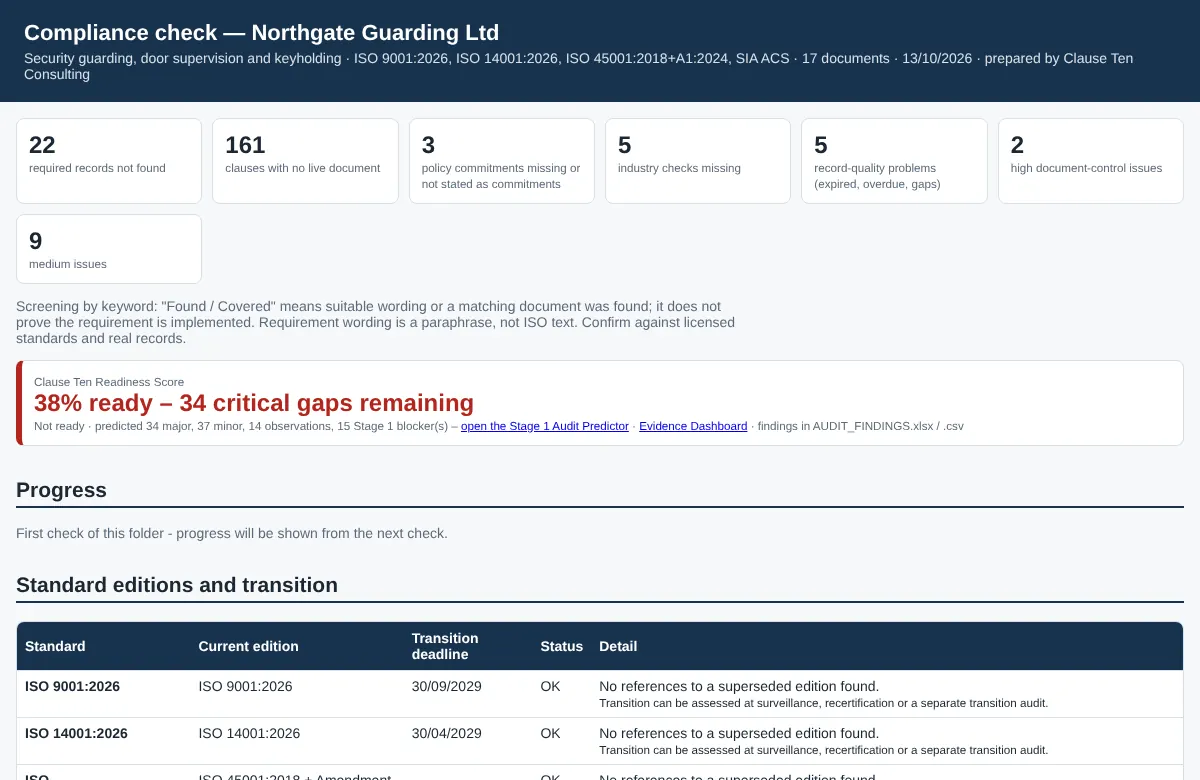
3 critical gaps remaining
See it in action
Real screens from the software, using a fictional security company. Choose a step to see what it does.
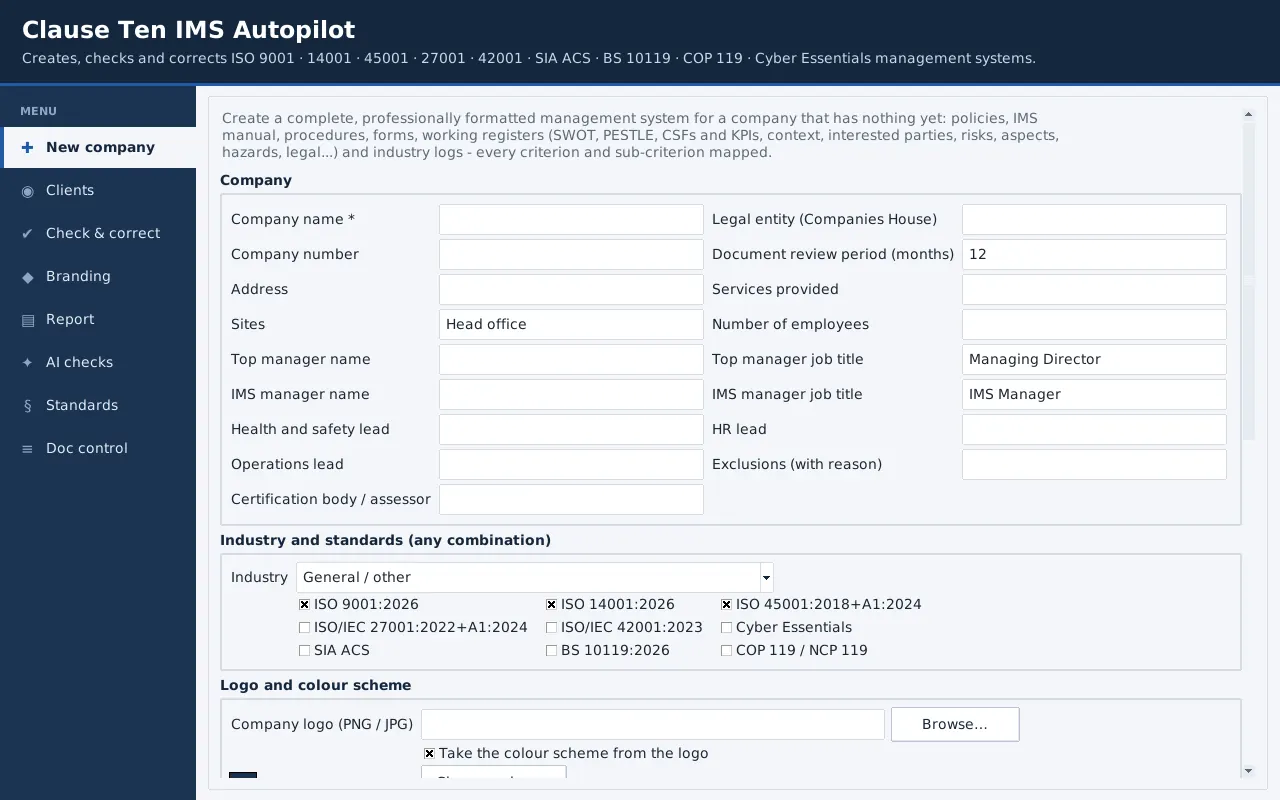
A complete, branded system for a new company
Enter the company details, tick the standards and add the logo. Autopilot creates the policies, manual, procedures, forms and registers, with an evidence file for every process.
- SWOT, PESTLE, objectives and KPIs filled in
- Every clause and sub-clause mapped
- Marked as a draft for the client to verify
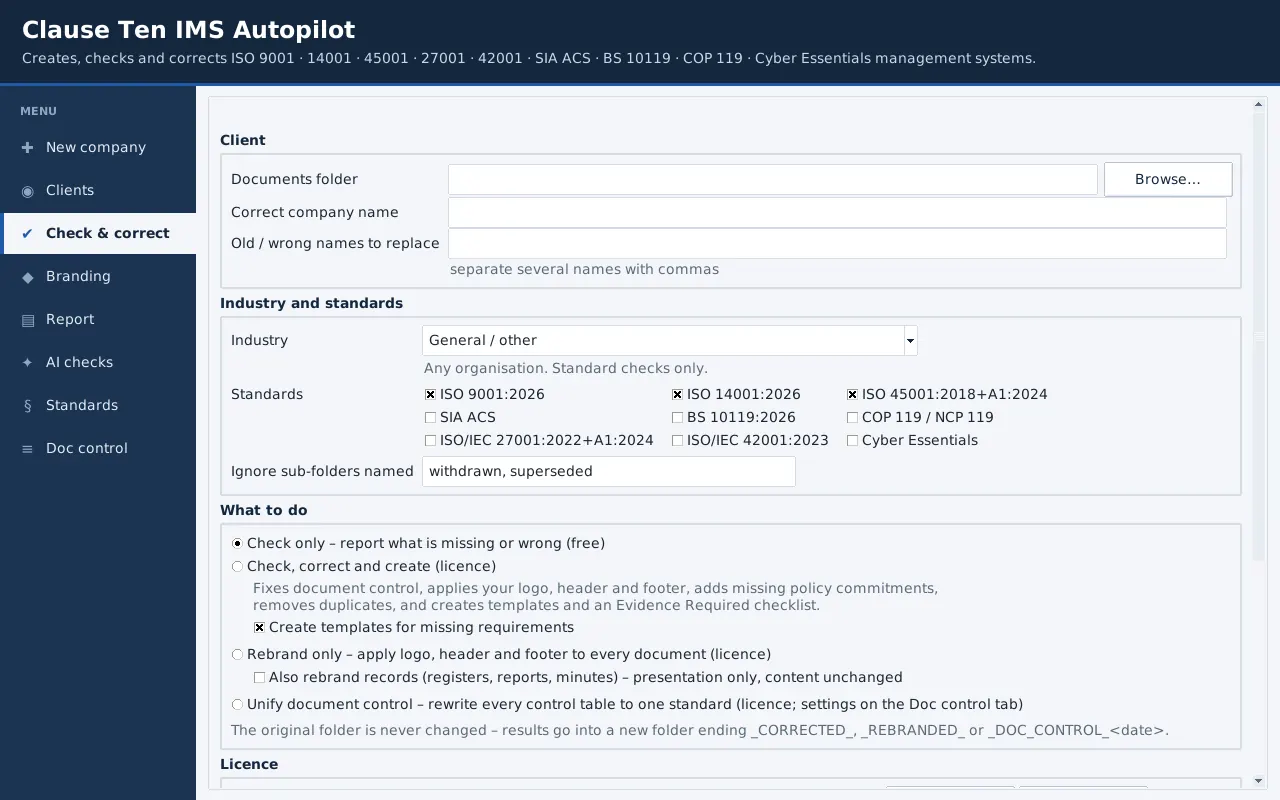
Check what a client already has
Point it at a folder of Word, Excel and PDF files. Check only is free, and your originals are never changed.
- Check, correct and create in one run
- Document control unified across every file
- Missing documents drafted for review
One clear readiness score
Critical gaps first, then a clause-by-clause view, transition status and record quality problems such as expired licences and overdue reviews.
- Readiness score and Stage 1 predictor
- Evidence matrix in Excel
- Progress shown on every re-check
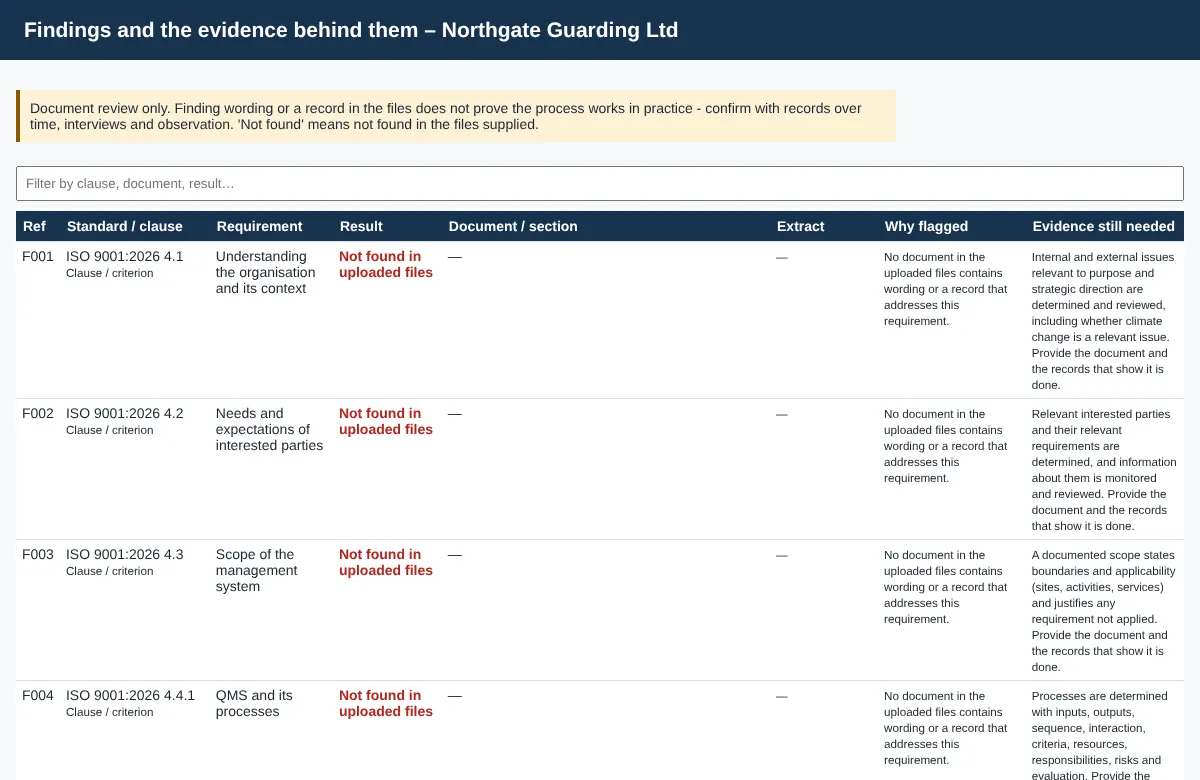
Evidence behind every finding
Each finding shows the document, the section, the extract that matched and what evidence is still missing.
- Honest labels: evidence located, not found, template only
- A document review never claims a process works in practice
- Searchable and sortable
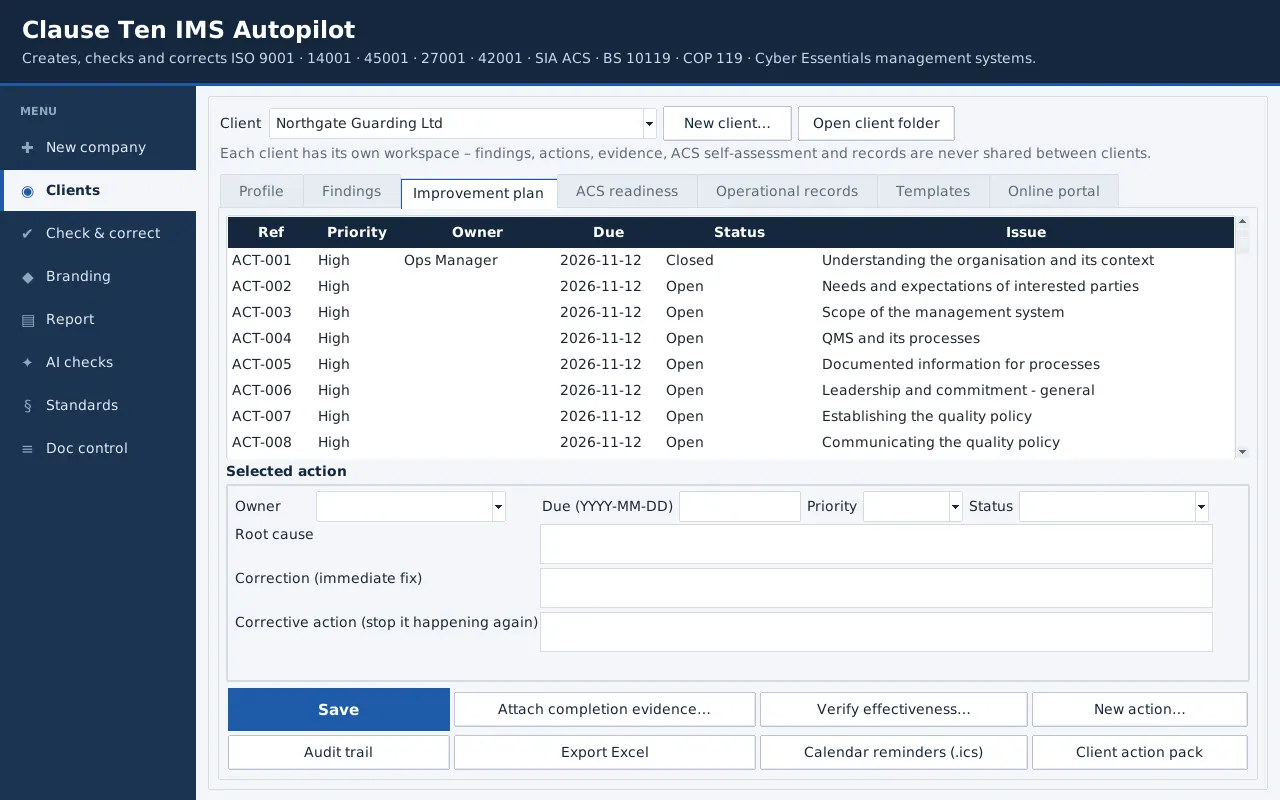
A managed improvement plan
Findings become actions with an owner, due date and priority. Record root cause and corrective action, attach completion evidence and verify effectiveness before closing.
- Calendar reminders and overdue alerts
- Tamper-evident audit trail of every change
- Client action packs in Excel
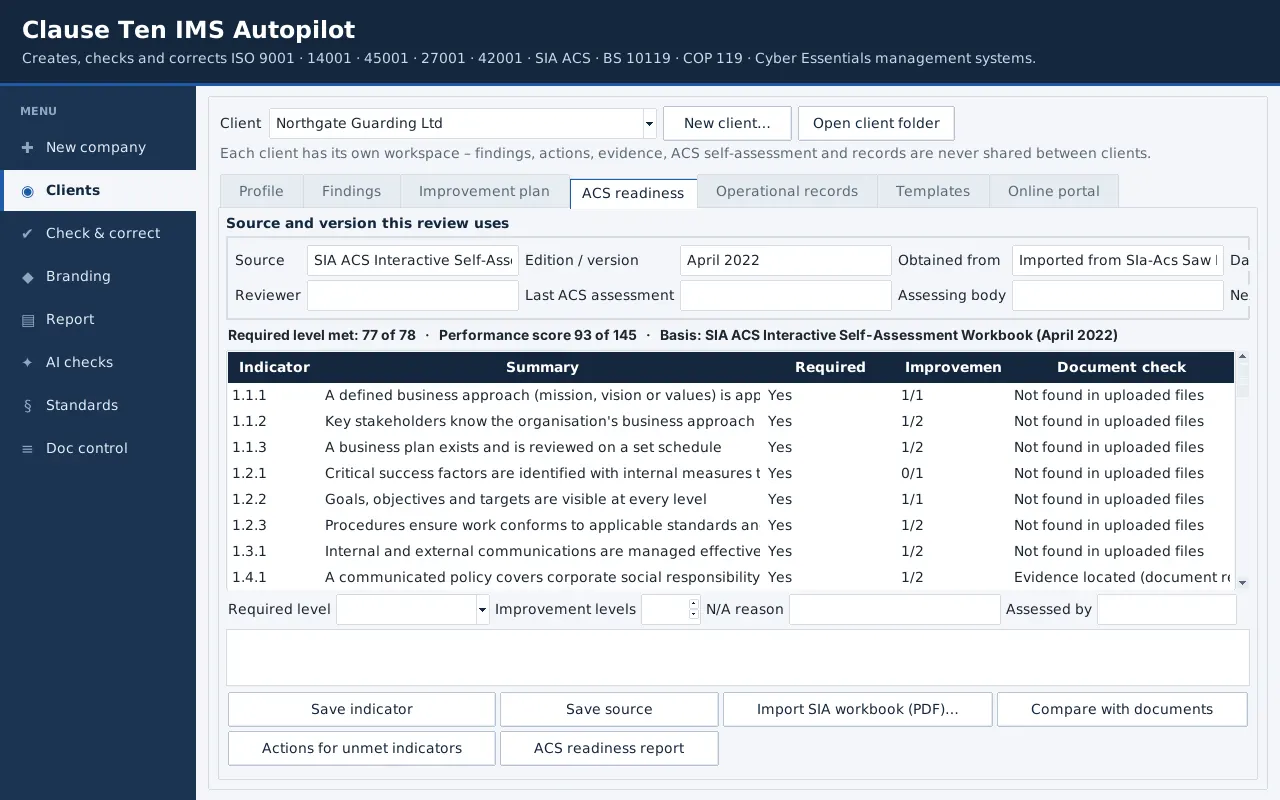
SIA ACS readiness workspace
All 78 indicators of the SIA self-assessment workbook, scored out of 145, with the source and version of each review recorded.
- Import a completed SIA workbook PDF
- Compare the self-assessment with the documents
- Actions created for unmet indicators
Online client portal for consultants
Invite client staff to a secure portal. They sign in with an emailed link, update their actions, upload evidence and complete operational records from their phone.
- Site visits, briefings, incidents, complaints, licence and screening checks
- Linked to the ACS and ISO requirements they evidence
- Only the consultant can close an action
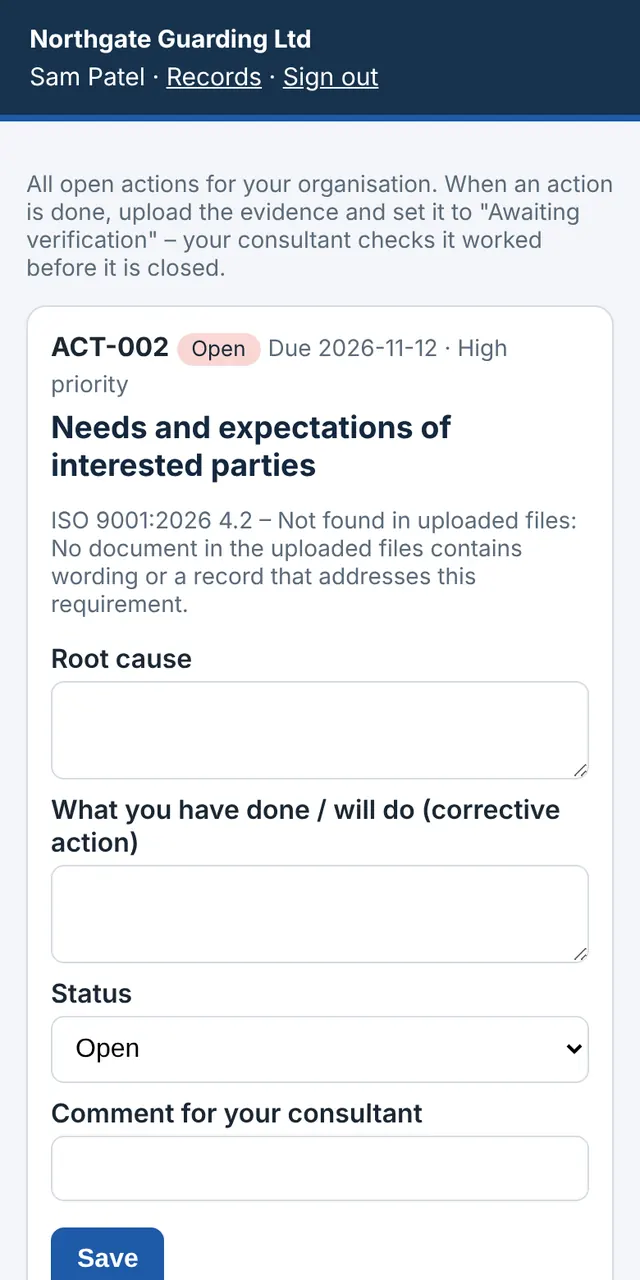
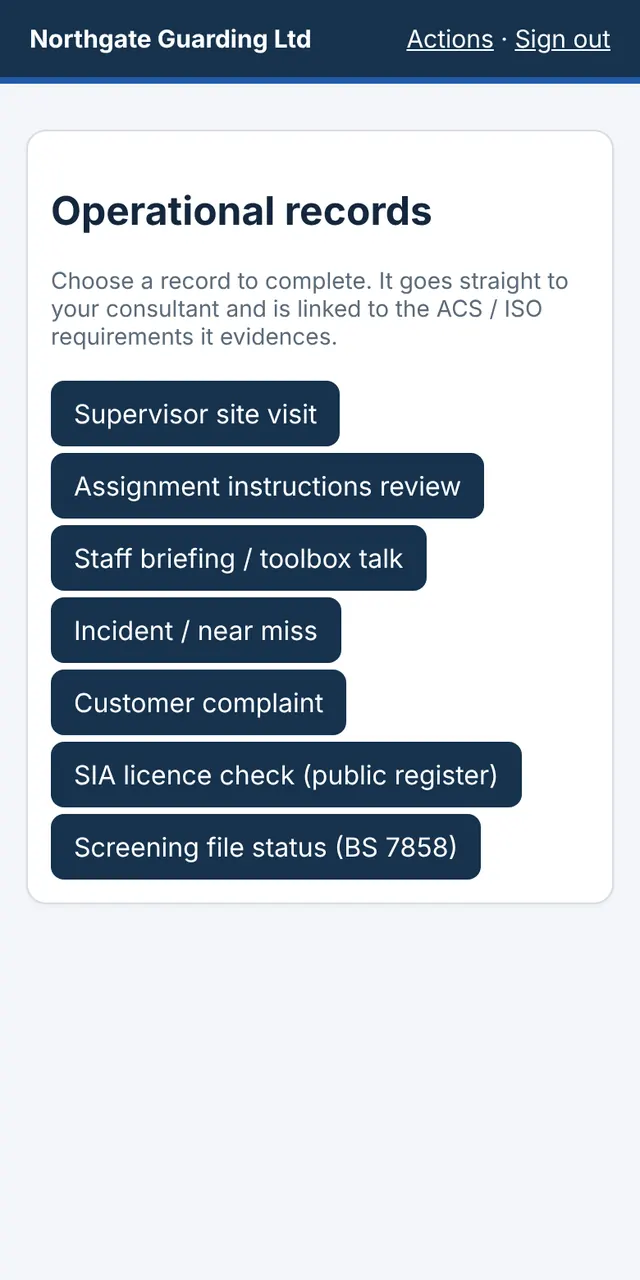
Northgate Guarding Ltd is a fictional demo company. Want to see it on your own documents? Book a free 30-minute demo.
How the gap analysis works
Three steps, a few minutes per client. Your originals are never changed. Every correction goes into a new copy.
Check
Reads Word, Excel and PDF documents and checks them clause by clause. It finds missing evidence, out-of-date references, expired SIA licences, overdue audits, policy commitments that aren't there and duplicate documents.
Correct
Rewrites every document control table to one standard, updates company names, versions and dates, applies your branding, headers and footers, and moves references to the 2026 editions.
Create
Drafts the procedures and records that are missing, tailored to the client's sector, ready for you to review. It also produces an action plan, evidence matrix and certification-body style findings report.
Audit readiness tools built for real certification audits
The features consultants and compliance managers ask for most.
Readiness Score
One clear figure with the critical gaps listed first.
Stage 1 predictor
Flags the issues an auditor is likely to raise before the day.
Evidence matrix
Every clause mapped to the document that proves it, in Excel.
Document control
Version, date, owner and approval made consistent everywhere.
AI drafting and second opinion
Missing procedures drafted for you, and an AI second opinion on every requirement marked covered – with a private AI on your computer or a secure AI service you approve.
Transition tracker
ISO 9001:2026, ISO 14001:2026 and BS 10119 deadlines and clause changes.
Security-sector checks
BS 7858 screening, SIA licences, right to work and labour supply chain.
Private by design
Runs locally. No client documents are uploaded anywhere.
Run every client's certification project in one place
For consultants and in-house teams: the work your client's staff do every week, tracked live and brought back into the software as audit evidence.
Mock audit – rehearse with an AI auditor
The software asks the questions a certification auditor or SIA assessor would ask, rates each answer and the evidence offered, and writes a readiness report with actions for every risk. An optional AI auditor gives a stricter second opinion.
UK legal register
Answer a few questions and get the health and safety, fire, environmental, security-industry, employment and data protection laws that apply, each linked to the official text, with a compliance evaluation and review reminders.
QR codes on every site
Print a poster per site. Officers and visitors scan it to report an incident, near miss, hazard, security concern or patrol check with a photo – no app or login. You get an alert, and it lands in the records.
Management review in one click
A management review pack built from live data – actions, audits, incidents, complaints, legal compliance, licences and training – with anything still needed clearly marked for the meeting.
Staff awareness training
Short lessons and quizzes for quality, environment, health and safety, information security, SIA ACS and data protection. Staff get a certificate; the training matrix updates itself.
Client portal and live dashboard
Each client sees progress for every standard, what is still required and what is due. Staff sign in with an emailed link or their Google account – no new passwords – as an administrator, contact or read-only viewer.
Works with Google Workspace
Clients sign in with Google, attach evidence straight from Google Drive, use Open with on any Drive file and save approved documents back to their Drive. The portal uses Google’s drive.file permission, so it only sees the files a person chooses. Desktop users can also save packs to Google Drive, OneDrive or SharePoint folders.
Approvals with e-signatures
Send a policy to managers to approve, or to staff to confirm they have read it. Typed-name signatures come back with the time, the document's fingerprint and a signature certificate.
Inspections and audits on a phone
Site inspections, health and safety walk-rounds, vehicle checks and an internal audit checklist for each standard – with photos, even with no signal. Nonconformities become actions automatically.
Alerts in Teams or Slack
Know when evidence arrives, an action is ready to check, a document is signed or an incident is reported – plus a weekly summary in the channel and by email.
Microsoft 365, SharePoint and Google Drive
Check documents straight from a SharePoint or Google Drive folder and save finished packs back – through synced folders, or directly to OneDrive and SharePoint.
SIA licences and training
A staff register with SIA licence, training and BS 7858 screening status, reminders at 90, 60 and 30 days, register checks recorded for ACS, and a link to your vetting provider.
All your clients on one screen
A web dashboard of every client: how complete they are, what is waiting for your check and which signatures are outstanding.
Consultant sales kit
A proposal, a sales presentation, a client kick-off and awareness deck and a task-and-time plan, in your branding, made in one click.
Standards covered: ISO 9001, 14001, 45001, 27001, 42001, SIA ACS, BS 10119, Cyber Essentials and SSIP
Requirements are written in our own words and checked against licensed copies of the standards. No standard text is reproduced.
What the ISO compliance software does for you
A typical client folder takes days to review by hand. Autopilot does the reading, cross-checking and paperwork in minutes, so the time goes on the decisions that need a person.
1. Gap analysis, clause by clause
Drop in a folder of Word, Excel and PDF documents. Every requirement of each chosen standard is checked and marked covered, partial or missing, with the document and page it found the evidence in. You get a gap analysis report and an Excel evidence matrix you can hand to an auditor.
2. Readiness score and Stage 1 prediction
One percentage shows how close you are to certification, with critical gaps listed first. The Stage 1 predictor lists the findings an auditor is most likely to raise, written in certification-body style, so nothing is a surprise on the day.
3. Document correction
Document control tables, version numbers, review dates, owners and company names are made consistent across every file. Your logo, headers and footers are applied, and references to old editions are updated. Your originals are never touched. Corrected copies go into a new folder.
4. Missing documents drafted
Where a procedure, policy or register is missing, a first draft is created, tailored to your sector and standards, ready for you to review and approve. It never invents records, signatures or evidence. Those stay with you.
5. 2026 transition tracking
Shows exactly what changes in ISO 9001:2026, ISO 14001:2026 and the move from COP 119 / NCP 119 to BS 10119, which clauses are new, and the date you must transition by.
6. Security-sector compliance
Built for security and labour-provision companies: all 78 SIA ACS indicators, BS 7858 screening, SIA licence and right-to-work checks, expiry warnings and labour supply chain controls, all checked against your staff records.
7. Integrated management system
Run several standards together. Shared clauses are checked once and mapped across ISO 9001, 14001 and 45001 (and others), so one document set supports your whole integrated system.
8. Action plan
Every gap becomes a task with a priority and the clause it closes. Re-run the check at any time to see the score rise as gaps are closed, which is useful evidence for management review.
Who uses our ISO and ACS software
Organisations going for certification
Know where you stand before you pay for an audit, and arrive at Stage 1 with a complete, consistent document set.
Certified organisations
Keep your system current between surveillance visits, prepare for the 2026 transitions and keep internal audits on track.
Consultants
Run gap analyses for many clients from one place, with your own branding on every report.
ISO gap analysis software for UK businesses
Preparing for ISO 9001, ISO 14001 or ISO 45001 certification, an SIA Approved Contractor Scheme (ACS) assessment or the move from COP 119 / NCP 119 to BS 10119 usually means weeks of reading documents against the standard. Complyvane does that review for you. It produces a clause-by-clause gap analysis, an ACS self-assessment, an evidence matrix and a Stage 1 audit readiness report, then corrects document control and drafts the procedures that are missing.
It is used by security companies, labour providers, facilities management, cleaning, construction, logistics and professional services firms across England, Scotland, Wales and Northern Ireland, and by ISO consultants who manage several clients. It also tracks the ISO 9001:2026 and ISO 14001:2026 transitions, and covers ISO/IEC 27001 information security, ISO/IEC 42001 AI management and Cyber Essentials.
Plans for consultants and organisations
Monthly or yearly subscriptions. Consultants choose Solo (up to 5 active clients), Practice (up to 15) or Firm (unlimited), all with every standard. Organisations certifying themselves choose one standard or all standards. Add the client portal (dashboard, e-signatures, phone inspections, QR reporting, staff training, alerts) to any plan. Expert pre-audit checks and audit attendance are available too.
Start a free 14-day trial
Every standard, two client workspaces and the client portal. Your key arrives by email – no card needed.
ISO and ACS software: frequently asked questions
Does it replace a consultant or an auditor?
No. It does the checking, formatting and first drafts that take most of the time, so you or your consultant can concentrate on judgement and real evidence. Certification decisions always stay with your certification body.
Where are my documents stored?
On your own computer. The software runs locally. Nothing is uploaded unless you choose to: cloud AI drafting (with a consent box), the client portal (only what you publish for that client) a OneDrive / SharePoint upload you start, or a Google Drive file you pick in the portal.
Will it make up evidence or records?
Never. It drafts procedures and templates for you to review and complete. It does not create records, signatures or approvals that haven't happened.
Which computers does it run on?
Windows 10 or 11 and macOS. There's a desktop app and a browser version that runs on your own machine.
Can I try it first?
Yes. Start a free 14-day trial above, or book a free demo and we'll run it on your own documents or a sample company.
How does licensing work?
Monthly or yearly subscriptions. The software renews your key automatically while your subscription is paid. Consultant plans are priced on the number of active clients; finished clients can be archived so they don't count. Your reports and corrected documents stay with you either way.
Does it work with Microsoft Teams, SharePoint and Google Drive?
Yes. Alerts go to a Teams or Slack channel, documents can be checked straight from a synced SharePoint or Google Drive folder, and packs can be uploaded directly to OneDrive or SharePoint.
Book a free ISO gap analysis demo
A free 30-minute demo, focused on the clauses that matter to you.